


The biggest appeal that forex trading offers is the ability to trade with margin.
But for many forex traders, “margin” is a foreign concept and one that is often misunderstood.
Margin trading gives you the ability to enter into positions larger than your account balance.
With a little bit of cash, you can open a much bigger trade in the forex market.
And then with just a small change in price moving in your favor, you have the possibility of ending up with massively huge profits.
But for most new traders, because they usually don’t know what they’re doing, that’s not what usually happens.
More likely, price does move, but it moves against them.
Before you choose a forex broker and begin trading with margin, it’s important to understand what all this margin jargon means.
Terrible things will happen to your trading account like a margin call or a stop out. But you won’t even know what just happened or even why it happened.
If you really want to understand how margin is used in forex trading, you need to know how your margin trading account really works.
This starts with understanding what the heck some (really important) numbers you see on your trading platform really mean.
We’ll call these numbers your margin account’s “metrics”.
For example, take a look at the MetaTrader 4, also known as MT4, trading platform:
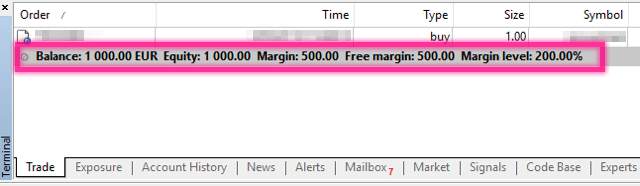
The metrics above are all intertwined.
A change in one causes a change in another.
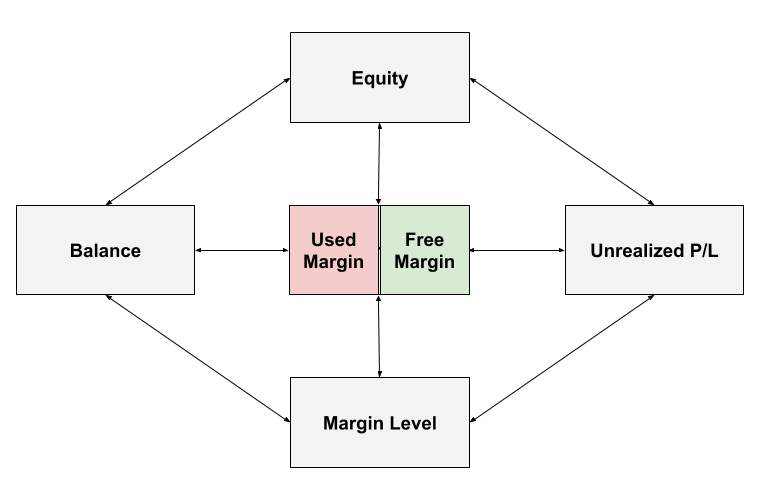
As a trader, you need to be aware of the relationships between them…
BEFORE ever entering a single trade on a live account.
Where certain metrics fall below a certain value, BAD THINGS will happen!
So you need to know what these metrics are!
You also need to know what these “bad things” are!
Make sure you have a solid grasp of how your trading account actually works and how it uses margin.
So let’s dive right in.
A margin trading account displays the following metrics:
- Balance
- Used Margin
- Free Margin
- Unrealized P/L
- Equity
- Margin Level
A metric is just a measurement of “something”.
This means that every metric above measure something important about your account involving margin.
For example, the “Balance” measures how much cash you have in your account. And if you don’t have a certain amount of cash, you may not have enough “margin” to open new trades or keep existing trades open.
Depending on the trading platform, each metric might have slightly different names but what’s being measured is the same.
Let’s take another look at the metrics on MetaTrader 4.
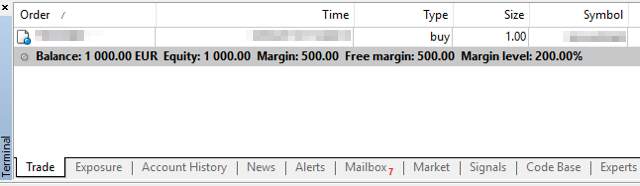
You’ll notice that it looks like that “Used Margin” is not displayed. But it’s there. MetaTrader 4 just displays it as “Margin”.
Here’s another example of account metrics from a different forex trading platform:

Same metrics as MetaTrader 4, but different labels.
Don’t worry about the different labels right now, we’ll explain each margin-related metric in a way that you’ll be able to know which metric is which regardless of the exact label.We’ll also let you know what other names that a specific metric is also known by. And at the end of this Margin Trading 101 course, we’ll provide a helpful “cheat sheet” for all this margin jargon.
Reprinted from Babypips,the copyright all reserved by the original author.
면책 조항: 본 게시글에 표현된 견해는 전적으로 작성자의 견해이며 Followme의 공식 입장을 대변하지 않습니다. Followme는 제공된 정보의 정확성, 완전성 또는 신뢰성에 대해 책임을 지지 않으며, 서면으로 명시적으로 언급되지 않는 한 해당 내용을 기반으로 취해진 어떠한 조치에 대해서도 책임을 지지 않습니다.

더 오래된 의견은 없습니다. 소파를 가장 먼저 잡으십시오.