

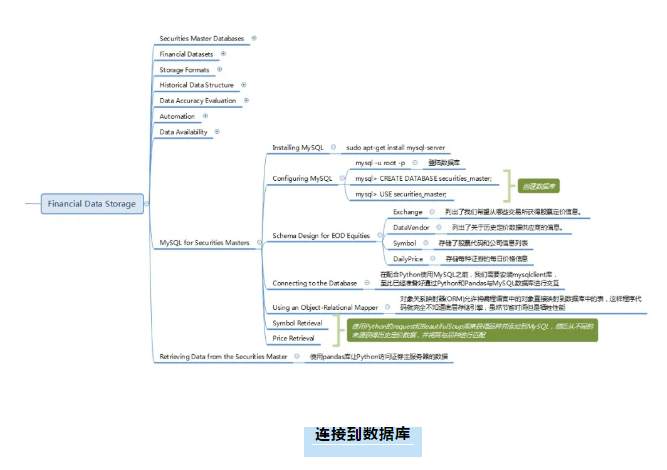
在配合Python使用MySQL之前,我们需要安装mysqlclient库。mysqlclient实际上是另一个库的分支,称为Python-MySQL。不幸的是,Python3不支持后一个库,因此我们必须使用mysqlclient。在Mac OSX/UNIX类型的机器上,我们需要运行以下命令:
sudo apt-get install libmysqlclient-dev
pip install mysqlclient
现在,我们已经准备好通过Python和pandas与MySQL数据库进行交互。
使用对象关系映射器
对于那些具有数据库管理和开发背景的人,您可能会问,使用对象关系映射器(ORM)是否更明智。ORM允许将编程语言中的对象直接映射到数据库中的表,这样程序代码就完全不知道底层存储引擎。他们不是没有他们的问题,但他们可以节省大量的时间。然而,节省时间通常是以牺牲性能为代价的。
一个流行的Python ORM是SQLAlchemy。它允许您在Python本身中指定数据库模式,从而自动生成CREATE TABLE代码。由于我们特别选择了MySQL,并且关注性能,所以本章选择不使用ORM。
品种检索
让我们从获取与标准普尔500只大盘股相关的所有股票代码开始,即标准普尔500指数。当然,这只是一个例子。如果你在英国进行交易,并希望使用英国国内指数,你同样可以获得在伦敦证交所(LSE)交易的FTSE100家公司的名单。维基百科方便地列出了标准普尔500指数的成分股。请注意,在标准普尔500指数中实际上有502个成分!我们将使用Python的request和BeautifulSoup库来抓取网站,然后直接将内容添加到MySQL中。首先,确保安装了库:
pip install requests
pip install beautifulsoup4
下面的代码将使用requests和BeautifulSoup库将这些品种直接添加到前面创建的MySQL数据库中。请记得将“密码”替换为您所选择的密码,如下所示:
#!/usr/bin/python
# -*- coding: utf-8 -*-
# insert_symbols.py
from __future__
import print_function
import datetime
from math import ceil
import bs4
import MySQLdb as mdb
import requests
def obtain_parse_wiki_snp500():
"""
Download and parse the Wikipedia list of S&P500
constituents using requests and BeautifulSoup.
Returns a list of tuples for to add to MySQL.
"""
# Stores the current time, for the created_at record
now = datetime.datetime.utcnow()
# Use requests and BeautifulSoup to download the
# list of S&P500 companies and obtain the symbol table
response = requests.get( "http://en.wikipedia.org/wiki/L..." )
soup = bs4.BeautifulSoup(response.text)
# This selects the first table, using CSS Selector syntax
# and then ignores the header row ([1:])
symbolslist = soup.select(’table’) .select(’tr’)[1:]
# Obtain the symbol information for each
# row in the S&P500 constituent table
symbols = []
for i, symbol in enumerate(symbolslist):
tds = symbol.select(’td’)
symbols.append(
(
tds.select(’a’).text, # Ticker
’stock’,
tds .select(’a’).text, # Name
tds .text, # Sector
’USD’, now, now
)
)
return symbols
def insert_snp500_symbols(symbols):
"""
Insert the S&P500 symbols into the MySQL database.
"""
# Connect to the MySQL instance
db_host = ’localhost’
db_user = ’sec_user’
db_pass = ’password’
db_name = ’securities_master’
con = mdb.connect(
host=db_host, user=db_user, passwd=db_pass, db=db_name
)
# Create the insert strings column_str = """ticker, instrument, name, sector,
currency, created_date, last_updated_date
"""
insert_str = ("%s, " * 7)[:-2]
final_str = "INSERT INTO symbol (%s) VALUES (%s)" % \
(column_str, insert_str)
# Using the MySQL connection, carry out
# an INSERT INTO for every symbol
with con:
cur = con.cursor()
cur.executemany(final_str, symbols)
if __name__ == "__main__":
symbols = obtain_parse_wiki_snp500()
insert_snp500_symbols(symbols)
print("%s symbols were successfully added." % len(symbols))
在此阶段,我们将在数据库中包含标准普尔500指数的所有502个当前符号成分。我们的下一个任务是实际地从不同的来源获得历史定价数据,并将其与品种进行匹配。
价格检索
为了获得当前标准普尔500指数成分股的历史数据,我们必须首先查询数据库中的所有符号列表。一旦返回了符号列表和符号id,就可以调用Yahoo Finance API并下载每个符号的历史定价数据。一旦我们有了每个品种,我们就可以依次将数据插入数据库。下面是实现这一点的Python代码:
#!/usr/bin/python
# -*- coding: utf-8 -*-
# price_retrieval.py5
from __future__ import print_function
import datetime
import warnings
import MySQLdb as mdb
import requests
# Obtain a database connection to the MySQL instance
db_host = ’localhost’
db_user = ’sec_user’
db_pass = ’password’
db_name = ’securities_master’
con = mdb.connect(db_host, db_user, db_pass, db_name)
def obtain_list_of_db_tickers():
"""
Obtains a list of the ticker symbols in the database.
"""
with con:
cur = con.cursor()
cur.execute("SELECT id, ticker FROM symbol")
data = cur.fetchall()
return [(d, d) for d in data]
def get_daily_historic_data_yahoo(
ticker, start_date=(2000,1,1),
end_date=datetime.date.today().timetuple()[0:3]
):
"""
Obtains data from Yahoo Finance returns and a list of tuples.
ticker: Yahoo Finance ticker symbol, e.g. "GOOG" for Google, Inc.
start_date: Start date in (YYYY, M, D) format
end_date: End date in (YYYY, M, D) format
"""
# Construct the Yahoo URL with the correct integer query parameters
# for start and end dates. Note that some parameters are zero-based!
ticker_tup = (
ticker, start_date-1, start_date ,
,
start_date, end_date-1, end_date,
end_date
)
yahoo_url = "http://ichart.finance.yahoo.co..."
yahoo_url += "?s=%s&a=%s&b=%s&c=%s&d=%s&e=%s&f=%s"
yahoo_url = yahoo_url % ticker_tup
# Try connecting to Yahoo Finance and obtaining the data
# On failure, print an error message.
try:
yf_data = requests.get(yahoo_url).text.split("\n")[1:-1]
prices = []
for y in yf_data:
p = y.strip().split(’,’)
prices.append(
(datetime.datetime.strptime(p, ’%Y-%m-%d’),
p, p, p, p , p
, p , p
, p )
)
)
except Exception as e:
print("Could not download Yahoo data: %s" % e)
return prices
def insert_daily_data_into_db(
data_vendor_id, symbol_id, daily_data
):
"""
Takes a list of tuples of daily data and adds it to the
MySQL database. Appends the vendor ID and symbol ID to the data.
daily_data: List of tuples of the OHLC data (with
adj_close and volume)
"""
# Create the time now
now = datetime.datetime.utcnow()
# Amend the data to include the vendor ID and symbol ID
daily_data = [
(data_vendor_id, symbol_id, d, now, now,
d, d, d, d, d, d)
for d in daily_data
]
# Create the insert strings
column_str = """data_vendor_id, symbol_id, price_date, created_date,
last_updated_date, open_price, high_price, low_price,
close_price, volume, adj_close_price"""
insert_str = ("%s, " * 11)[:-2]
final_str = "INSERT INTO daily_price (%s) VALUES (%s)" % \
(column_str, insert_str)
# Using the MySQL connection, carry out an INSERT INTO for every symbol
with con:
cur = con.cursor()
cur.executemany(final_str, daily_data)
if __name__ == "__main__":
# This ignores the warnings regarding Data Truncation
# from the Yahoo precision to Decimal(19,4) datatypes
warnings.filterwarnings(’ignore’)
# Loop over the tickers and insert the daily historical
# data into the database
tickers = obtain_list_of_db_tickers()
lentickers = len(tickers)
for i, t in enumerate(tickers):
print(
"Adding data for %s: %s out of %s" %
(t, i+1, lentickers)
)
yf_data = get_daily_historic_data_yahoo(t)
insert_daily_data_into_db(’1’, t, yf_data)
print("Successfully added Yahoo Finance pricing data to DB.")
请注意,当然有一些方法可以优化这个过程。例如,如果我们使用Python ScraPy库,我们将从下载中获得高并发性,因为ScraPy构建在事件驱动的Twisted框架上。目前,每个下载将按顺序执行。
【交易学习】
【交易员洞察】
【基础知识】
【货币交易】
【黄金交易】
면책 조항: 본 게시글에 표현된 견해는 전적으로 작성자의 견해이며 Followme의 공식 입장을 대변하지 않습니다. Followme는 제공된 정보의 정확성, 완전성 또는 신뢰성에 대해 책임을 지지 않으며, 서면으로 명시적으로 언급되지 않는 한 해당 내용을 기반으로 취해진 어떠한 조치에 대해서도 책임을 지지 않습니다.

더 오래된 의견은 없습니다. 소파를 가장 먼저 잡으십시오.